
How to make ramen photo stickers and keep a diary with RAMEN TRIP
Start a ramen photo journal with one bowl. Learn to select a photo, create a sticker, organize a collection, arrange a scrapbook and revisit meals on the diary calendar.
Want to remember the ramen you eat, but find it hard to write a review after every meal? Start with a photo. RAMEN TRIP is a ramen diary app built around turning bowl photos into white-bordered stickers. An ordinary lunch or a bowl on a trip can become part of a collection you enjoy revisiting.
Make a ramen photo sticker in four steps
1. Take a photo or choose one from your library
Use the camera to capture a bowl, or select a photo you already have. Follow the shop's photography rules and keep other diners out of the frame. One quick picture is enough; enjoy the ramen while it is warm.
2. Turn the photo into a sticker
Cut out the bowl and give it a white border. Cutout support depends on the device, operating system and photo. When cutout is unavailable, you can keep the photo in a frame. A clear separation between bowl and background makes the shape easier to check.
These stickers are collected and arranged inside the app. Their use differs from printed stickers and the sticker feature built into your phone's photo app.
3. Organize your collection
Use favorites and folders to group the stickers you collect. Think about what you will want to revisit: bowls from a trip, or ramen you would like to eat again. You do not have to classify every meal.
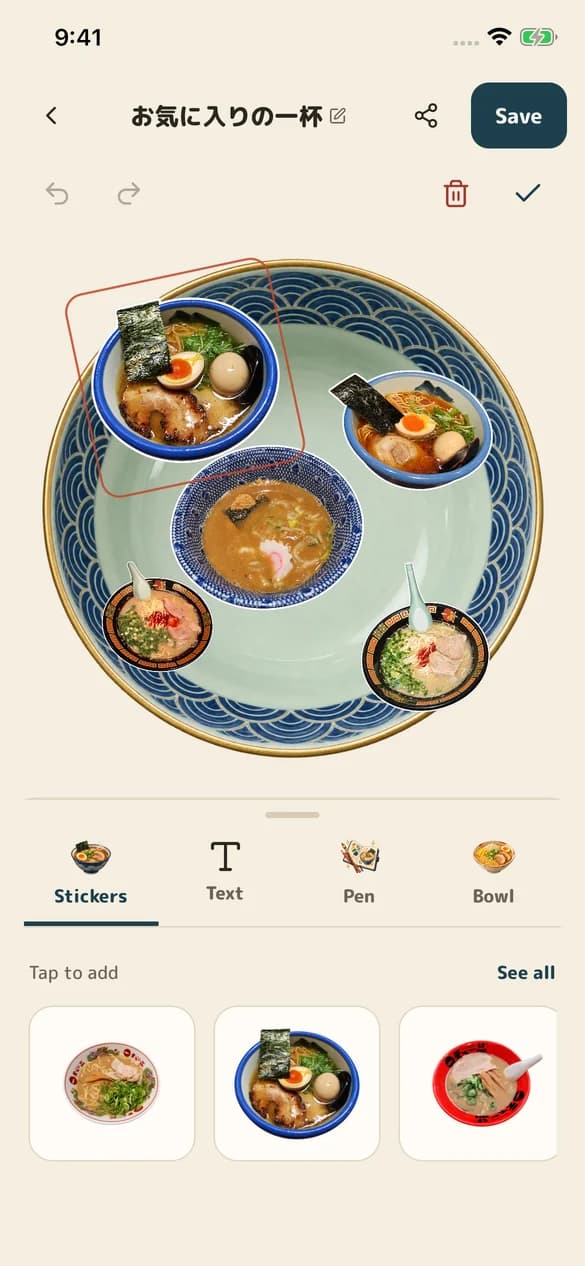
4. Arrange stickers on a bowl or scrapbook
Choose a bowl or scrapbook background, place your stickers and add text or pen marks. Make a travel collage or give a single bowl its own page. A photo journal can be personal without turning every meal into a score.
Revisit meals with the photo diary calendar
A photo diary uses pictures as prompts to remember a day. RAMEN TRIP's calendar lets you revisit bowls by date. Start on days you want to remember instead of trying to fill every square.
If a photo leaves something out, keep a short note too: a rainy afternoon, a meal with a friend, a flavor you would order again. For help describing taste, see the ramen vocabulary guide.
Remember places with your personal map
Records connected to shops can be revisited on My Map. The calendar answers “when”; the map helps with “where.” Together with the photo, a location can bring back a meal from your travels.
Discover bowls through public stickers
Browse public stickers or make your own stickers public. Before sharing, check for other people and information you would rather keep private.
Getting started: account and free allowance
Start as a guest and connect a Google account when needed. Sign in with Apple is also available on iOS.
6 creations per month, shared between photos and AI generation. After the free allowance, each creation costs 20 MENKA.
MENKA is the in-app currency. See the purchase screen for currency prices and paid-feature terms. AI generation is optional.
Manage and delete your records
Delete photo diary entries and stickers from their detail screens, and scrapbooks from their menus. Account deletion is available from My Page. See support and the privacy policy for retention and public information.
If you are still choosing a way to keep your meals, read how to choose a ramen diary app. Your next bowl is enough to begin.